CLI Reference
scan
Scan repository and evaluate architectural rules.
Arguments:
| Argument | Default | Description |
|---|---|---|
PATH |
. |
Repository root |
Options:
| Option | Default | Description |
|---|---|---|
--model FILE |
architecture.yml |
Architecture model file |
--rules FILE |
rules.pacta.yml |
Rules file (repeatable) |
--format {text,json} |
text |
Output format |
--baseline REF |
- | Compare against baseline snapshot |
--save-ref REF |
- | Save snapshot under this ref |
--mode {full,changed_only} |
full |
Evaluation mode |
-q, --quiet |
- | Summary only |
-v, --verbose |
- | Include all details |
Examples:
# Basic scan
pacta scan . --model architecture.yml --rules rules.pacta.yml

# Quiet mode (CI-friendly)
pacta scan . --model architecture.yml --rules rules.pacta.yml -q

# Save baseline
pacta scan . --model architecture.yml --rules rules.pacta.yml --save-ref baseline

# Check against baseline (fail only on new violations)
pacta scan . --model architecture.yml --rules rules.pacta.yml --baseline baseline

# JSON output for CI integration
pacta scan . --model architecture.yml --rules rules.pacta.yml --format json
Example output:
✗ 1 violations (1 error)

  ✗ ERROR [no-domain-infra] Domain cannot depend on Infrastructure @ src/domain/service.py:5:1
    status: new
    "app.domain.BillingService" in domain layer imports "app.infra.PostgresClient" in infra layer
Violations are displayed with human-readable explanations:
- For dependency violations: Shows which module imports/calls/uses another, with their respective layers
- For node violations: Shows the element type and where it was found (layer, container, context)
check
Evaluate architectural rules against an existing snapshot and write violations back into it.
This separates the "capture" step (snapshot save) from the "verify" step (check), allowing you to snapshot your architecture once and check it against different rule sets or at different times. The existing snapshot object is updated in-place — no new snapshot is created.
Arguments:
| Argument | Default | Description |
|---|---|---|
PATH |
. |
Repository root |
Options:
| Option | Default | Description |
|---|---|---|
--ref REF |
latest |
Snapshot ref to check |
--model FILE |
architecture.yml |
Architecture model file |
--rules FILE |
rules.pacta.yml |
Rules file (repeatable) |
--format {text,json} |
text |
Output format |
--baseline REF |
- | Compare against baseline snapshot |
--save-ref REF |
- | Also save result under this ref |
-q, --quiet |
- | Summary only |
-v, --verbose |
- | Include all details |
Examples:
# Check latest snapshot against rules
pacta check . --rules rules.pacta.yml

# Check a specific snapshot ref
pacta check . --ref v1 --rules rules.pacta.yml

# Check against baseline (only new violations fail)
pacta check . --baseline baseline --rules rules.pacta.yml

# JSON output
pacta check . --rules rules.pacta.yml --format json
Typical workflow:
# Step 1: Capture architecture
pacta snapshot save . --model architecture.yml

# Step 2: Evaluate rules against the snapshot
pacta check . --rules rules.pacta.yml

# Or do both in one step:
pacta scan . --model architecture.yml --rules rules.pacta.yml
snapshot save
Save architecture snapshot without running rules.
Options:
| Option | Default | Description |
|---|---|---|
--ref REF |
latest |
Snapshot reference name |
--model FILE |
architecture.yml |
Architecture model file |
Examples:
# Save snapshot
pacta snapshot save . --model architecture.yml --ref v1

# Save another version
pacta snapshot save . --model architecture.yml --ref v2
diff
Compare two architecture snapshots.
Options:
| Option | Required | Description |
|---|---|---|
--from REF |
Yes | Source snapshot ref |
--to REF |
Yes | Target snapshot ref |
Examples:
history show
View architecture timeline (list of snapshots).
Options:
| Option | Default | Description |
|---|---|---|
--last N |
- | Show only last N entries |
--since DATE |
- | Show entries since date (ISO-8601) |
--branch NAME |
- | Filter by branch name |
--format {text,json} |
text |
Output format |
Examples:
# Show all snapshots
pacta history show .

# Show last 10 entries
pacta history show . --last 10

# Filter by branch and date
pacta history show . --branch main --since 2025-01-01

# JSON output for scripting
pacta history show . --format json
Example output:
Architecture Timeline (3 entries)
============================================================

a1b2c3d4  2025-01-22  abc1234  main          42 nodes   87 edges   2 violations (latest)
e5f6g7h8  2025-01-20  def5678  main          42 nodes   85 edges   4 violations
12345678  2025-01-18  789abcd  feature/x     40 nodes   82 edges   3 violations
history export
Export full history data for external processing or SaaS integration.
Options:
| Option | Default | Description |
|---|---|---|
--format {json,jsonl} |
json |
Export format |
-o, --output FILE |
stdout | Output file path |
Examples:
# Export as JSON
pacta history export . --format json > history.json

# Export as JSON Lines (one entry per line)
pacta history export . --format jsonl > history.jsonl

# Export to file
pacta history export . -o export.json
JSON output structure:
{
  "version": 1,
  "exported_at": "2025-01-22T12:00:00",
  "repo_root": "/path/to/repo",
  "refs": {
    "latest": "a1b2c3d4",
    "baseline": "e5f6g7h8"
  },
  "entries": [
    {
      "hash": "a1b2c3d4",
      "timestamp": "2025-01-22T12:00:00+00:00",
      "commit": "abc1234",
      "branch": "main",
      "refs": ["latest"],
      "node_count": 42,
      "edge_count": 87,
      "violations": [...]
    }
  ]
}
history trends
Show metric trends over time with ASCII charts or export as images.
Options:
| Option | Default | Description |
|---|---|---|
--metric {violations,nodes,edges,density} |
violations |
Metric to track |
--last N |
- | Show only last N entries |
--since DATE |
- | Show entries since date (ISO-8601) |
--branch NAME |
- | Filter by branch name |
--width N |
60 |
Chart width in characters |
--format {text,json} |
text |
Output format |
-o, --output FILE |
- | Export chart as image (PNG/SVG) |
Metrics:
| Metric | Description |
|---|---|
violations |
Total violation count (default) |
nodes |
Architecture component count |
edges |
Dependency count |
density |
Coupling ratio (edges/nodes) |
Examples:
# Show violation trends (default)
pacta history trends .

# Show node count trends
pacta history trends . --metric nodes

# Show density trends (edges/nodes ratio)
pacta history trends . --metric density

# Filter by branch and limit
pacta history trends . --branch main --last 10

# JSON output for scripting
pacta history trends . --format json

# Export as PNG image (requires pacta[viz])
pacta history trends . --output trends.png

# Export as SVG for docs/presentations
pacta history trends . --metric violations --output violations.svg
Image Export:
To export charts as images, install the visualization extras:
This adds matplotlib support for PNG, SVG, and PDF export.
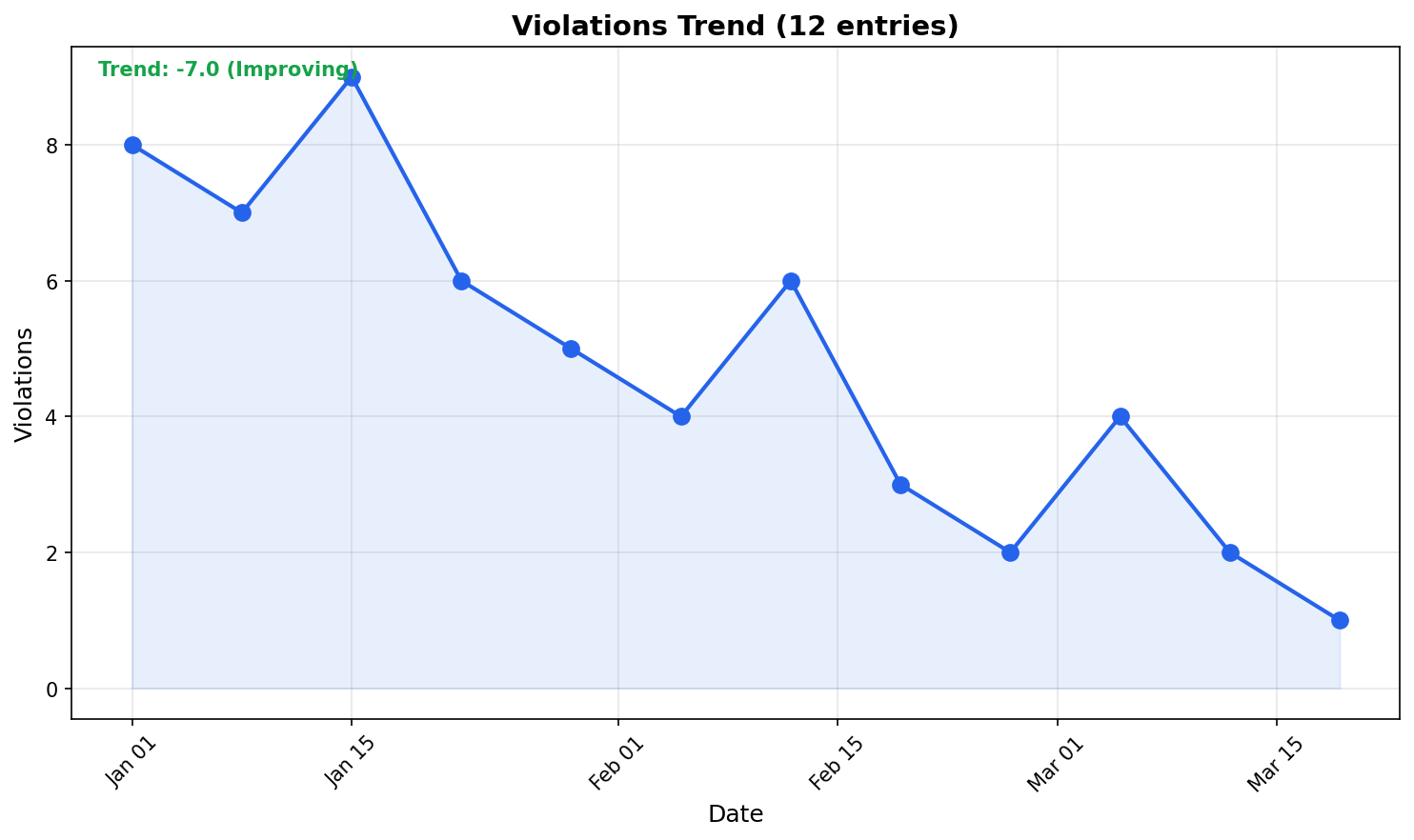
Example output:
Violations Trend (5 entries)
============================

  5 |      *
  4 |  *       *
  3 |              *
  2 |                  *
  1 |
  0 |
    +--------------------
      Jan 15      Jan 22

Trend: Improving (-3 over period)
First: 4 violations (Jan 15)
Last:  2 violations (Jan 22)

Average: 3 violations
Min: 2, Max: 5
Exit Codes
| Code | Meaning |
|---|---|
0 |
Success, no violations |
1 |
Violations found |
2 |
Engine error |